Posts Tagged ‘Website copywriting’

Powerful Copywriting


If I asked you to give me an example of powerful copywriting what you say?

  • Something that catches your attention immediately
  • A headline which draws you in
  • Simple to read copy with lots of headings

Hopefully your answer was something along those lines. Powerful copywriting is all of those things.

The problem is when some people try to write strong copy they get it all wrong. Bear with me and I’ll explain.

Shouting copy

A few days ago, I was writing some web copy for a client and my husband was working from home. He works for a German company and deals with a lot of customers located around Europe.

That particular day he was engaged on a phone call to one such customer. Instead of his usual voice, I heard a rather strained conversation being conducted in very slow, broken English.

He, like many of us, is guilty of adopting the technique of speaking very s-l-o-w-l-y and loudly when speaking to a non-native English speaker.

What does that have to do with copywriting? Well, it is something you also see in print in the mistaken belief it is getting your message across strongly.

The problem is, people try to replicate the ‘hard sell’ type of copy for their own websites, newsletters and emails. You know the kind of thing I mean – long copy, bright colours, bold text and lots of highlighting. Don’t get me wrong, that type of copy has its place and (believe it or not) works – but it isn’t a style that should be used for everything.

Building confidence

The problem with that type of text on your website, or in your newsletters, is that it doesn’t instil confidence.

Your words have to convince rather than your font size and colour.

Your copy has to resonate with and engage your reader so they are drawn into your copy. Then, by focusing on the benefits, you will convince them they have to have your product or service.

Don’t use brash and in-your-face sales techniques – chose your words carefully and:

  • Create a strong headline
  • Capture their attention immediately with benefits led copy
  • Keep your font uniform and only change size for headings and sub headings
  • Use only one colour for your font (preferably black or white)

Your copy will look professional and readable.

Would you want to look at a site full of colourful text of varying size? I doubt it, and neither would your readers. If you want to be taken seriously, make sure you approach your marketing materials in the same way.

Be professional, be clear and concentrate on your benefits.

Website Copywriting–Being Effective


Website copywriting is just one of the services I offer my clients. Creating copy that is effective is essential if you want your website visitor to become a paying customer.

Generating copy that is interesting, relevant and that sells isn’t as easy as it sounds and there are a number of factors that you must consider when creating your website copy.

In fact, these factors are equally relevant when writing copy for all your marketing materials such as brochures, case studies, newsletters, emails etc.

Even though you are writing about your products and services, it is your reader who must be at the forefront of your mind. Ask yourself:

  • Who am I writing this for?
  • What do I want to achieve through this copy?
  • Why do I need to write the copy?

That’s a lot to think about so the easiest way to explain how to write effective website copy is to look at it from a journalist’s point of view:

Website copywriting for your customers

W-W-W-W-W-H

No, I haven’t gone mad. Let me explain a bit further.

Who

Think about who your product or service is going to help. If you can answer that you know who  your target market is. When you know that, you can establish the tone and voice you will use to convey your message (i.e. conversational, formal etc.)

What

This might sound a bit daft but think about what you’re writing and what it will mean to your customers. This thought process will help you identify the main benefits of your product or service – essential to help them reach a buying decision.

Where

Asking you to think about where your customer can get your product or service probably sounds stupid but you’d be amazed at how many websites omit this vital piece of information. If you copy does convert them into buyers but you don’t tell them how to get their hands on your product you’ll lose them.

Why

This one is all to do with the benefits again. Rather than just list them, relate them back to your customers life to illustrate how your product or service will help them. Whether it’s saving time, money or making them more glamorous, tell them directly as you should never assume they’ll instantly see the bigger picture.

How

This is the nitty gritty of your product. Make sure you explain how it works, how much it costs, where they can buy it, what the guarantee is, what the postage costs are etc. Make everything crystal clear so they don’t have to go looking for answers.

By taking all of those areas into consideration your website copy should address all your customers needs and questions.

Other than that, make sure:

  • You keep it simple using simple language and no jargon
  • Use a clear call to action so your reader knows what you want them to do
  • Never make exaggerated claims – be honest
  • Any offers you use must appeal to your market and you can make them extra beneficial by limiting the offer to a time period or number of customers

Writing your copy with your customer in mind will help you focus on what is really important. Make sure that information is at the beginning of your copy to get them hooked straightaway. Other information, such as features, can go further down to reinforce their decision to buy.

How To Keep Your Readers’ Attention


desk

Getting someone to find your website is one thing. Encouraging them to read your content while they are there is something entirely different.

If you market your business online you probably spend hours producing content that is designed to promote you and your business and build links.

To target your audience you would have done a mountain of research to come up with a list of topics for your blog posts, articles and website copy.


Once you’ve uploaded your fantastic value-laden information and hit publish…

…absolutely nothing happens.

No matter how often you check there are no tweets (not even a re-tweet), no comments, no nothing.

Your immediate reaction is probably “Argh! My writing must really suck.”

But don’t despair – your style of writing is probably fine. It is more likely that the structure of your articles and blogs is leaving your readers bemused.

When writing for the web the best thing you can do is forget everything your dear old English teacher taught you.

You need to spend less time writing and more time thinking about how you structure your work.

Writing online

When reading from the web people tend to scan read rather than read every word.That’s because they are searching for information and if they can’t find it quickly, they’ll move on to another website.

So if you want to keep them engaged you have to rethink your writing style.

1. Snappy

The length of your writing should be just long enough to cover what you want to say without waffling.

If you’re writing about a very complex issue it may be worth breaking it down into several posts. Not only will that make it much easier for your reader to follow, it will also encourage them to come again for your subsequent posts.

Plus start at the end – with your conclusion. That might sound odd by that way you are immediately giving your readers what they want. The all you have to do is provide supporting evidence point by point.

2. White space

If your text is in one long wall of text or several long paragraphs it won’t look very inviting.

Lighten it by increasing the amount of white space on your page. Break it down into small paragraphs (no more than 3 or 4 sentences each). Or you could go really mad and use a single sentence paragraph.

3. Sub headings

Inserting informative sub headings between your paragraphs will help your reader get the gist of your post while they are scanning the page.

4. Bullets

  • Using bullet points creates interest
  • Highlights important points
  • Are instantly scan-able
  • Draw the reader’s eye as they break up the rest of the text

5. Links

By all means link to your own website through your posts but don’t forget external information sources too. This will show your reader that your information is well considered (and it may also generate a link from your source too).

6. Bold

Use bold text to pick out important concepts within your post. These, coupled with the sub headings, should help your reader fully understand the topic you are covering and whether it will be of interest to them.

7. Numbers

Some people have said that the days of the numbered posts—such as “8 Top Tips to Improve Your Copywriting” are gone. But reader’s still love them.

8. Check and check again

Before publishing read through your work to make sure it makes sense, This will also check for rhythm, typos and other errors.

Writing informative posts is one thing but if you want people to read them they must be presented in a way that:

  • Gets your concept over immediately
  • Looks attractive and readable
  • Gets to the point

Read All About Us


ctaAs a website copywriter, I have been know to harp on about your website copy should address the needs of your reader.

What do I mean?

Basically, your content must focus on the benefits of your product/service to the reader rather than focusing on your company and its accomplishments.

That may sound easy but it isn’t. To create great copy that’s compelling, you have to distance yourself from your business which is why many companies opt for the services of a professional copywriter.

Writing for your reader is the way to go but that doesn’t mean you have to totally forget about yourself. You still need an outlet on your website where you can shout about you and what you’ve done. And that’s what your ‘About Us’ page is for.

Do people really read the About Us page?

Yes.

We all need to know who we are buying from - the face behind the business. We want to be reassured they are someone we can trust which is why the About Us page exists. So don’t blow it.

Meaningful

Make it meaningful which means don’t fill it with jargon and technical speak. You won’t impress your reader just because you know a few long words. If your content isn’t meaningful it won’t have an impact.

Be yourself

This is your opportunity to sell you as a person. Which means don’t use a stock photo on your About Us page, use one that shows you and your team – why hide?

Be real

Write in a friendly conversational style. Tell your reader why you started your business. The process you went through to develop it into the company it is today. Make it a human interest story – but make sure it is real. Don’t try and pull the wool over your readers’ eyes.

Don’t hide

If you want your contact details on this page make sure they’re accessible and include:

  • A valid email address
  • Telephone number
  • Full postal address
  • A map

Back it up

Include testimonials or sound bites from happy customers. But make sure you reference them – a testimonial without a name is worthless.

Your About Us page is very important. It’s not a main sales page but it shows your reader who you are and why they should do business with you.

Use it to show your human side and connect with them.

Does My Business Need a Website?


houseDespite living in a virtual age there are still many businesses out there resisting the urge to have a website.

Some of the common arguments about not buying into virtual real estate are:

  • It wouldn’t suit our customer base
  • We get enough customers without having an expensive website
  • I don’t understand all that computer stuff
  • It’s too expensive
  • I don’t want to sell online
  • I don’t have time for one of those

The problem is just about everyone else is online, especially your customers. So when they search for a supplier they’ll be choosing from your competitors – you won’t even be in the picture.

To convince you it may be worth taking the plunge, here are 4 reasons why you should consider a website for your business:

1. 24/7

Do you really want to have to be physically there for your customers all the time?

Achieving the ultimate work/life balance is tough but when you own your own company it can be impossible.

Unlike you, a website doesn’t need to eat, drink or sleep and is open for business 24/7. Your customers can browse it whenever the urge takes them. By giving them all the information  they need they can research at their leisure. Plus if you offer a comprehensive FAQ section, you’ve practically got your own online customer service team.

2. Credibility

People research before buying. Your website and its content will help instantly build rapport and credibility with perspective customers. Talk to them directly through your copy and they will be more inclined to do business with you as they will already feel as though they ‘know’ you.

If you don’t feel confident enough to create your own website copy, hire a professional copywriter to write it for you. That investment will ensure your website contains copy that is powerful, search engine friendly and will convince your customers to get in touch and buy.

3. Money

As I mentioned before, a website is open 24/7 so you’re not restricting your trading times. People can shop with you in the middle of the night if they really wanted to. With over half of all UK consumers now regularly shopping online (Forrester UK Online Retail and Travel Forecast 2008-2014), if you don’t have a website you’ll be turning your back on a vast untapped marketplace.

4. Widen the net

Your website will widen your marketplace. You won’t have to rely on local customers and word of mouth anymore. With a website you can reach national and international markets. This could lead to business growth, diversification…the opportunities are endless.

Budgets are tight for everyone at the moment so if you can’t quite run to a full blown website try some of the alternatives. I’m thinking of websites such as BT Tradespace and myProspot. Both of these offer the opportunity of utilising their powerful platforms and extensive social marketing tools to market your business.

So as you can see, there really are no barriers to getting a website.

Google Instant Preview

The SEO Low Down

Google is constantly changing. It loves to keep internet marketers on their toes by changing the goal posts every so often.

One of the most recent changes that you’re bound to have noticed is the introduction of Google Instant Preview.

Now, when you enter a search term in the Google search box, each of your results will have a little magnifying glass next to it. Designed to help you search smarter, by clicking on the magnifying glass you bring up a preview of the web site so you can see in an instant whether it’s going to be of interest to you. Google instant preview

So now, rather than having to open a site, scan it, realise it’s not for you, hit the back browser and start all over again – you can scan the results without leaving the page to find the website that’s going to offer you what you’re looking for.

How does that effect SEO?

Well, to be honest, no one is really sure at the moment. But what it does mean is that you have to be sure your website is maximised to attract the click-through. Basically you have to make sure that the preview gives them the information they need to choose you.

Here are a few things you can do to tip the balance in your favour:

Say farewell to flash

As you know, flash is not good for SEO because the search engine spiders have a tough time crawling it and are unable to distinguish between normal text and the more prominent heading text (i.e. H1, H2 tags etc.)

An added complication now arises with the arrival of Google Instant Preview because the Preview can’t render the flash element of your website leaving it looking rather distorted and unattractive.

Basically if you want your website to shine, ditch the flash.

META Descriptions

You already know that your META Description doesn’t have a direct effect on your SEO as far as ranking position goes. But it comes into its own when it comes to attracting click-throughs.

The 150-160 characters must convince the searcher that your website is worth checking out because it offers the information they need to know. If you want your magnifying glass to be clicked make sure your META Description tells them what they need to know by including your keywords.

Headings

The size of the preview means the reader isn’t going to be able to make out all the text on your website. That’s why it’s imperative that you use good, descriptive headings within your site that contain your keywords.

By acting as sign posts, they will show the reader what information is available on your web page so their decision to click will be based on what they can see – your headings, layout and images.

Images and Alt tags

Using the right images can make your website. They should be relevant and interesting enough to lure your reader in. Also, to give your SEO as much of a boost as possible, you must also ensure you utilise their Alt tags and filenames making them descriptive, relevant and contain your keywords.

It doesn’t matter what line of business you’re in - a copywriter, electrician, solicitor or builder – these 4 techniques will help boost the attractiveness of your website.

In the ways of the web, looks and substance are both needed if you want to attract traffic. Remember the preview shows only a reduced scale version of your website so you’ll needs as many visual cues as possible to get the click.

How Not to Design a Website


XWhether you’ve got a website and need a revamp or you’re just starting out on  the web there are certain things you need to avoid when thinking about your design.

Remember that your website is, in effect, your online shop window. Think about how it will be viewed by your visitors, what they will want to see and what they’ll need to know.

Don’t be complicated

If a visitor lands on your website they will want to be able to find out what they need to know quickly and easily.

If they’re faced with numerous options, confusing navigation and a ‘busy’ Home page they are more than likely going to wander off and find another less complicated site. 

Although you need links within your text to aid navigation, don’t over do it. There’s nothing more off putting than text littered with links and – more to the point – vast quantities of boxes in the sidebar containing links and asking them to do umpteen things.

Make your navigation simple and logical.

Flash

At one time Google couldn’t read flash and so it was pretty useless when it came to SEO. Now, the search engine spiders can crawl through it but it still has limited effectiveness when it comes to search engine optimisation.

If you can live without it do, if you can’t keep it to an absolute minimum.

Pretty pictures

Pictures are great but can be over done.
Use them to enhance your text or show your products off. But make sure they are great images, bad ones can kill a website.

And don’t forget that images can also help you with your SEO.

How fast?

Long loading times are a killer. No one wants to hang around while your site loads, even if it does have a little count down graphic.

Google likes sites that load quickly as this post from the Google Official Webmaster Central Blog shows.

The offer

Your website is there to sell so you must have a call to action and an offer.

Some people get so wrapped up in SEO and the look of their site they completely miss it’s main purpose – it’s a sales tool. Without an offer and a clear call to action your website will be completely ineffective.

Of course, along with a new design, fresh content is always a good idea so hiring a good SEO copywriter is always a great investment

Building Links For SEO


linkSearch engine optimisation – three words that can fill any internet marketer with dread.

If you opt for the PPC (pay per click) route, you may see faster results but you’ll also experience the high price tag that tends to come with it. SEO may be slower but it’s a more economical long term solution.

To get an SEO strategy that works, you’ll need 3 things:

  • An SEO friendly website that is easy to navigate (for the reader and search engine spiders)
  • Great content written by a professional SEO Copywriter
  • Back links

Yes, I know what you’re thinking but it really will pay to get experts in to help you with the first two on the list.

Many business think they can generate their own copy. But there is a real art to writing to sell on the web and writing something that is going to help with your SEO. I am an SEO copywriter and therefore you probably think I’m just trying to scare you into hiring me (or someone like me) but I’m not. Ask your web designer’s advice and he/she will tell you exactly the same thing.

To get a website that works, converts and ranks you must have all three elements listed above.

So what about backlinks?

When it comes to building backlinks, you must think long term.

There are companies out there who will help you buy links but that often causes more harm than good. The best option is to do it yourself – it takes time and you may need to have a couple of people working on it for you, but it’s by far the best way to go.

I stumbled across this post on Seomoz.org which gives an example of how this can work. Take a look at Rob Ouseby’s post “Create A Link Building Team Within Your Organisation” and see what tips you can pick up to make your whole organisation a continuous link building machine.

Remember a good SEO strategy is on going and involves a well structured website, professional SEO copywriting and continuous backlink building.

Make Your Web Writing Interesting


grub

Once upon a time if you wanted to research a subject you had to go to the library and scour numerous reference books for the information you needed.

Today, you just have to Google it.

So how long will it be before the humble books is consigned to the history web pages of the internet?

With the arrival of the Kindle reader (iPad and smartphones) the traditional book looks to be under threat of extinction. This ‘electronic-paper’ wonder  is supposed to offer a reading experience that looks and reads like real paper.

Really?

Not for me thanks. When I read I like to hold a book; fold back the cover and turn proper pages. I love the way its spine creases, the smell of its pages, the way you can insert your bookmark (only to lose it and then have to spend hours trying to find the page you were on).

Even though they take up vast amounts of space in your luggage, there is something very special about a book – for a start it’s battery is never going to go flat.

Reading on the web

If the text of a book is fairly small, you’ll still read it. If the text on a web page is tiny you won’t bother.

Writing for the web is very different from writing for printed media. Reading from a screen is difficult, tiring and really quite boring. So how do you overcome that to encourage people to read your website?

Make your writing look interesting

If you want people to read your content you have to make it look attractive and the best way to do that is to ensure there is:

  • Lots of white space
  • Headings and sub headings
  • Short paragraphs
  • Bulleted lists

Basically, if you want people to read the content on your website you have to make it look inviting. Your copy has to be interesting, relevant and search engine friendly. Getting the right amount of content on your page is vital – but good SEO Copywriting doesn’t necessarily mean writing thousands and thousands of words.

So how many words should you have per page? There is no right or wrong answer to that, just make sure you use as many words as you need without waffling. So long as your content is interesting, relevant and attractive, people will read it.

Get To Grips With On Page SEO


grip

Every business with a website is after good Google rankings.

With more and more people turning to the internet for goods and services, you’ve got to be listed if you want to be found. Which means your listing has to be on the front page.

The copy on your website has to contribute to getting great rankings and it has to be interesting and relevant to your reader. That’s a tough combination to achieve which is why it is vital your business invests in the services of a good SEO Copywriter who really knows what they are doing.

SEO Cheatsheet

If you are still determined to do your website copy in-house, you’re going to need some help. Luckily I stumbled across a post on Conversion Marketing which will help you out no end.

If it’s your job to manage what appears on your website (images, articles, web copy etc.), this post is for you. If you’re not email the link to this for the person who does – they’ll thank you forever.

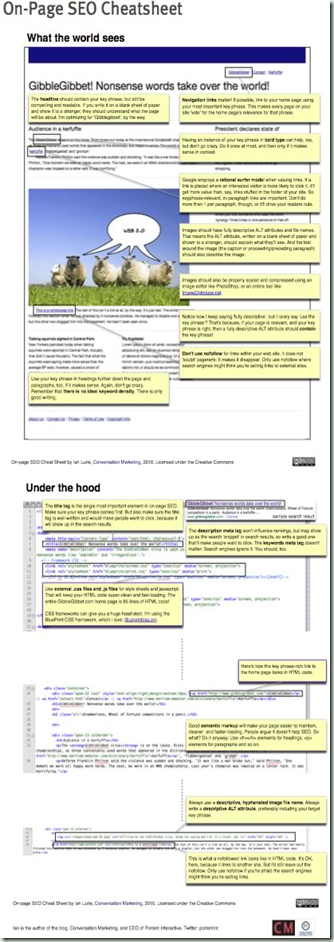
Conversion Marketing have put together a great On Page SEO Cheatsheet. It tells you how to get the most from your website’s on page search engine optimisation elements:

image

You can get your very own copy by clicking here and downloading the PDF.

Now you can discover how web pages work in the SEO arena and help optimise your own to give your Google rankings a boost.

Related Posts with Thumbnails